Lessons on LeetCode: Part I
Things I learned from solving LeetCode problems in Python
The meta lessons:
Learn patterns not problems.
Visualize. Visualize. Visualize.
Think about how to solve the problem before writing code.
Think out loud.
Its ok to start with brute force.
Never assume.
1. Comparison in Loops.
To solve comparison based problems, my first instinct was to always loop through two arrays.
However, if a comparision (
a,b) is the same as (b,a), a simple trick is to start the second array from current position of the first array i.e., instead of comparing items in the full square shown below, only compare items in the upper triangle.
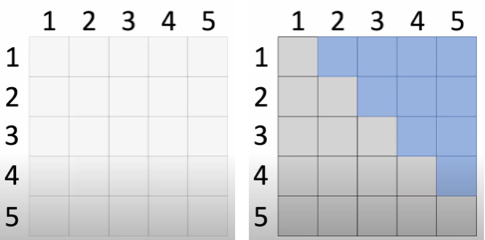
for i in range(len(nums)):
    for j in range(i+1, len(nums)): # This is the upper triangle
        print(nums[i], nums[j])
2. The advantage of using a while loop over a for loop.
# I am habituated to think like a for loop, to convert for loop to while loop
for i in range(k):

# To make this a while loop it requires initialization, update and termination for the loop variable
i = 0
while i < k:
    # somewhere inside
    i += 1
3. Principle of not materializing unnecessary data structures Or “there are ways to know about things without creating the thing”.
For example:
a. To know the length of the longest sequence, you don’t have to create the actual sequence. You can just keep track of the length as you go.
# Instead of creating the sequence, keep track of the length as you go
longest = 0
for i in range(len(nums)):
    longest = max(longest, nums[i])
b. When dealing with paths in a graph or tree, you might not need to store the entire path, but just keep track of relevant information about it (like its length, start and end points, or some aggregated value).
# Instead of storing the entire path, just track the running sum
max_sum = float('-inf')
current_sum = 0
for num in nums:
    current_sum = max(num, current_sum + num)
    max_sum = max(max_sum, current_sum)
This can lead to more efficient algorithms in terms of both time and space complexity.
Python related (syntax and more) tricks, which I never bothered to learn until I started solving LeetCode:
1. Deletion in lists and dicts
# delete an item from a list using index
a = [10, 12, 13, 14, 15]
del a[3] # deletes the item in index 3

# Interestingly, the same method works to remove an item from dictionary based on key
mydict = {5: 3, 2: 1, 3: 3, 1: 2}
del mydict[5]
print(mydict)

# delete an item from a list using value
a = [10, 10, 12, 13, 14, 15]
a.remove(10)
2. On Sets.
Sets and dictionaries are both implemented using hash tables, this means that they have constant lookup time O(1) i.e., better than a list which is O(n) lookup.
Before Python 3.7, sets and dicts were unordered collections i.e., the concept of indexing did not apply. When we print them, they are in random order. Since Python 3.7, dictionaries preserve insertion order (!important). For sets, this is still true. When we print them, they are in random order.
# Simple set operations
lista = [10, 12, 13, 14, 15, 14, 14]
seen = set()
for a in lista:
    if a in seen:
        print(f"Repeated: {a}")
    else:
        seen.add(a)
3. On Dictionaries.
# Dict get method with default return values
chars = "believers"
mydict = {}
for char in chars:
    # If it finds, it returns the stored value. If not return a 0
    mydict[char] = mydict.get(char, 0) + 1 # Genius way to count chars in a string
print(mydict)
Dict keys and values are of type dict_keys and dict_values respectively. We need to convert them to list explicitly. The order of keys and values in dict_keys and dict_values are same as that in the dict (preserves insertion order).
mydict = {1: 3, 2: 2, 3: 1}
print(mydict)
print(list(mydict.keys()))
print(list(mydict.values()))
4. On chars and strings.
# Sorting characters can be useful, e.g., checking if two strings are anagrams
sorted("listen") == sorted("silent") # True

# ord() returns the unicode value of a character, chr() converts back
ord('a')       # 97
chr(ord('a') + 1)  # 'b'
5. On Lists and Tuples.
Lists are mutable (can be changed after creation) but tuples are immutable. We can perform type conversion with tuple() and list() to convert between them.
# Tuples are immutable
b = tuple([1, 2, 3]) # tuple expects single iterable argument like a list during creation
b[0] = 10 # This raises TypeError: 'tuple' object does not support item assignment

# Lists are mutable
a = [1, 2, 3]
a[0] = 10 # This works! Lists can be modified
print(a) # [10, 2, 3]

# If we do tuple() on a list, it becomes immutable
a = [1, 2, 3]
b = tuple(a)
b[0] = 10 # This is NOT allowed
6. Semicolons in Python.
Unlike C or Java, semicolons are optional in Python.
breakandbreak;work exactly the same way. You might see them occasionally, but they are not idiomatic Python.
Additionally, here are some Python tricks I learned from watching Youtube videos from Karpathy (a wizard):
1. Using zip to grab pairs of items.
ids = [1, 2, 3, 4]
for item in zip(ids, ids[1:]):
    print(item) # Gets the pairs (1,2), (2,3), (3,4)
                # If its changed to ids[2:] we get (1,3), (2,4)

# Utilizing zip to traverse the upper triangle (discussed above).
nums = [1, 2, 3, 4, 5]
for i in range(1, len(nums)):
    for item in zip(nums, nums[i:]):
        print(item)
2. Returning conditions instead of if-else.
# 1. Instead of using if and else like this:
if pattern_word == pattern:
    return True
else:
    return False

# 2. Return the condition itself
return pattern_word == pattern
3. Printing variables with their names.
# Print a variable with its name
print(f'{log_likelihood=}')
# prints log_likelihood=tensor(-38.7856)
4. Joining a list of strings.
# Join a list of strings
words = ["Hello", "World!"]

# Join with empty string
result1 = ''.join(words)
print(result1)  # HelloWorld!

# Instead of empty string, you can use space, comma, newline etc.
# Join with space
result2 = ' '.join(words)
print(result2)  # Hello World!

# Join with newline
result4 = '\n'.join(words)
print(result4)
# Hello
# World!
5. Initializing an array of given size.
# Initializing an array of given size
new_arr = [0] * size